Yep, we may get a tiny thank-you (read: commission) when you buy through
links on Techspotr — not enough for a yacht, but enough to keep the lights (and
servers) on.
Learn more
37
Highlights
49
Differences
7
Reactions
0
Likes
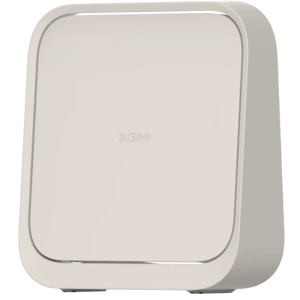
XGIMI MoGo 4
vs
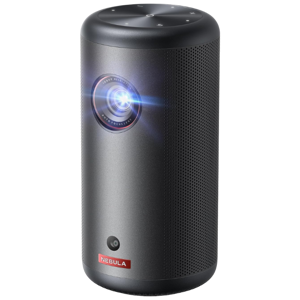
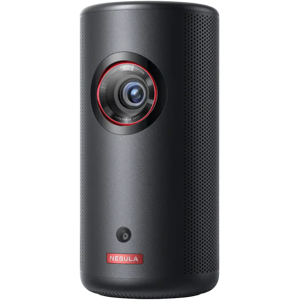
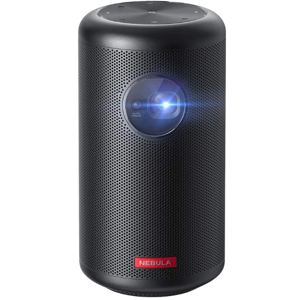
Nebula Capsule 3 Laser:
37 Highlights & 49 Differences —
So, Which Projector Actually Works Better
Get to know which portable projector fits your needs better with this quick comparison. Both are great options with distinct advantages.
What sets XGIMI MoGo 4 and Nebula Capsule 3 Laser apart? We looked at their product type, native resolution, throw ratio & manual focus range and key differences in this complete projectors face-off.
XGIMI MoGo 4 vs Nebula Capsule 3 Laser: A Thorough Portable Projector Showdown
When it comes to portable projectors, the XGIMI MoGo 4 and Nebula Capsule 3 are two titles that often come up for those seeking quality home theater and outdoor entertainment experiences. Both models utilize DLP projection chips to display sharp 1080p images, run Android TV operating systems with voice control, and are designed for versatility wherever you are. Despite these shared features, their core differences are striking enough to influence your choice. The MoGo 4 boasts a more robust brightness output of 450 ANSI lumens and advanced 10-bit color processing, while the Capsule 3 relies on laser phosphor technology with longevity and startup speed advantages. From contrast ratios and audio configurations to projection flexibility, this comparison will deep-dive into where each projector excels and where compromises are made.
Illuminating Excellence With the XGIMI MoGo 4
The XGIMI MoGo 4 commits firmly to delivering a vivid viewing experience with its higher brightness rating of 450 lumens compared to the Capsule 3's 300 lumens. This improvement, coupled with a notable 1000:1 contrast ratio, means visuals pop with better separation between light and dark areas, enhancing movie nights or presentations in dim rooms. HDR10 support with a peak brightness of 450 nits ensures that highlights display intensely and colors are rendered with deeper accuracy through its 90% color gamut coverage and 10-bit color depth. All these features are paired with an AI-enhanced image processor that sharpens details and offers smart calibration to optimize picture quality.
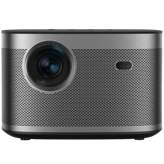
Optically, the MoGo 4 supports 1.1x optical zoom and a fixed throw ratio of 1.2:1, enabling flexible screen sizes up to 200 inches, quite expansive for a projector of its class. Complementing this are auto vertical and horizontal keystone corrections, ensuring crisp, undistorted images even when placement isn't perfectly aligned. The use of a glass lens with anti-reflective coating boosts clarity and reduces stray light, supported by a dustproof lens design for durability.
Audio technology on the MoGo 4 is designed for immersive sound, featuring stereo speakers totaling 6W power with Dolby Audio enhancements; a step above many portable options. It also offers dual USB ports (USB-A and USB-C) and HDMI 2.0 for greater connectivity. The inclusion of a backlit smart remote improves user experience in low-light settings, alongside richer built-in storage at 32GB for apps and offline content. This 2025 model does trade off some fan noise, measured at 44.5 dB, potentially notable in very quiet rooms.
Why Nebula Capsule 3 Laser Still Shines Bright in Portability and Convenience
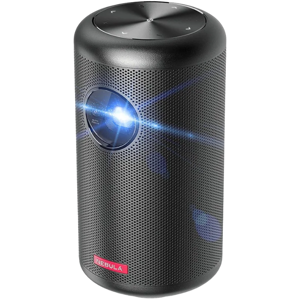
The Nebula Capsule 3 Laser brings a different set of strengths to the table, especially geared toward users who value portability and smart features for multi-location use. Weighing only 2.1 pounds and measuring a compact 3.3 x 3.3 x 6.7 inches, it's considerably easier to carry around than the MoGo 4's 2.9 pounds and larger form factor. This makes it excellent for travel, camping, or casual setups where size and weight matter.
Its standout feature is the laser phosphor light source, which promises an extended 30,000 hours lifespan; significantly longer than MoGo 4's LED module rated for 20,000 hours. Startup speed is also a highlight with an ultra-quick 3-second power-on, ideal for spontaneous viewing. The laser also helps keep fan noise low at 28 dB, greatly reducing operational distractions.
The Capsule 3 Laser supports multiple projection alignments including front, rear, ceiling, and tabletop projection, enhancing installation versatility. Although it maxes out at 120 inches screen size with a throw ratio range of 1.0-1.5, it benefits from a shorter minimum throw distance of 2.2 feet, which is useful in tight spaces. While its contrast ratio (500:1) and brightness output are lower than the MoGo 4, it compensates with built-in streaming apps such as YouTube, Prime Video, Disney+, and Hulu built right in, plus support for AirPlay alongside Chromecast, giving users a broader set of media input options.
In audio, the Capsule 3 Laser features a more powerful 8W mono speaker setup and Dolby Audio support, producing loud and clear sound suitable for on-the-go use. Connectivity includes HDMI 2.1 and USB-C ports, although it lacks the USB-A option present in the MoGo 4. Despite fewer enhancements in optical features like zoom or keystone correction, it offers solid auto focus and lens protection via dustproof glass. Included accessories even add an HDMI cable, which the MoGo 4 does not provide. Pricing-wise, the Capsule 3 is more budget-friendly, starting under $400, making it accessible for entry-level users.
Quick Take
The XGIMI MoGo 4 clearly scores high on brightness, color fidelity, and optical sophistication, making it a robust choice for those wanting a premium viewing experience at home or semi-portable setups. Meanwhile, the Nebula Capsule 3 Laser shines in portability, operational quietness, and extended light source longevity, perfect for users prioritizing flexibility and ease-of-use in diverse environments.
Bottom Line
For buyers looking to prioritize crisp, bright images with richer color and advanced projection options, the $469 XGIMI MoGo 4 delivers the best overall package. Conversely, if portability, faster startup, silent operation, and built-in app variety rank highest in your criteria, the Nebula Capsule 3 is a compelling, cost-effective solution that excels on the move.
Verdict
Winner: XGIMI MoGo 4 - Outstanding brightness, color accuracy, and refined optics for high-quality home theater use.
Runner-up: Nebula Capsule 3 Laser - Superior portability, longer laser lifespan, and excellent streaming support for versatile, lightweight setups.
Side by side. The numbers. The features. No drama.
Can’t decide between XGIMI MoGo 4 and Nebula Capsule 3 Laser? This in-depth projectors breakdown highlights what makes each product unique — from standout features and hidden quirks to pricing, performance, and what actual users are saying.
XGIMI MoGo 4 was released in 2025, making it a newer model compared to Nebula Capsule 3, which was released in 2023. This might mean XGIMI MoGo 4 has more up-to-date features.
Shows the year the projector model was released.
In the battle of Release Year,
XGIMI MoGo 4 ◉ is
worse than
Nebula Capsule 3 Laser ◉
, delivering
lower
28 score
measurement.
Don’t keep it to yourself — be the first to react and review the
Release Year on XGIMI MoGo 4 ◉
vs Nebula Capsule 3 Laser ◉ and help others decide!
XGIMI MoGo 4 is available in Silver, while Nebula Capsule 3 comes in Black. Your color preference will determine which projector you prefer aesthetically.
Indicates the color finish of the projector body.
In the battle of Color,
XGIMI MoGo 4 ◉ is
worse than
Nebula Capsule 3 Laser ◉
, delivering
lower
35 score
measurement.
Don’t keep it to yourself — be the first to react and review the
Color on XGIMI MoGo 4 ◉
vs Nebula Capsule 3 Laser ◉ and help others decide!
What is the intended usage type of this projector?
28
XGIMI MoGo 4
0Votes
Home Theater, Outdoor
73
Nebula Capsule 3 Laser
0Votes
Home Theater, Outdoor, Gaming
vs
Intended Usage Type
XGIMI MoGo 4 is intended for Home Theater and Outdoor use, whereas Nebula Capsule 3 adds Gaming to its intended usage types. Nebula Capsule 3 caters to a wider audience, including gamers.
Describes the ideal application for this projector.
In the battle of Intended Usage Type,
XGIMI MoGo 4 ◉ is
worse than
Nebula Capsule 3 Laser ◉
, delivering
lower
45 score
measurement.
Don’t keep it to yourself — be the first to react and review the
Intended Usage Type on XGIMI MoGo 4 ◉
vs Nebula Capsule 3 Laser ◉ and help others decide!
XGIMI MoGo 4 uses DLP Projection Technology Type, while Nebula Capsule 3 employs DLP and Laser Phosphor. Nebula Capsule 3's laser phosphor light source generally offers better color accuracy and a longer lifespan.
Identifies the core imaging technology used.
In the battle of Projection Technology Type,
XGIMI MoGo 4 ◉ is
worse than
Nebula Capsule 3 Laser ◉
, delivering
lower
55 score
measurement.
Don’t keep it to yourself — be the first to react and review the
Projection Technology Type on XGIMI MoGo 4 ◉
vs Nebula Capsule 3 Laser ◉ and help others decide!
43
Nebula Capsule 3 Laser
0Votes
Home Theater, Portable
vs
Product Type
The Product Type for XGIMI MoGo 4 is Portable, while Nebula Capsule 3 is classified as Home Theater and Portable. Nebula Capsule 3 offers more versatile usage contexts.
Defines the general classification of this projector.
In the battle of Product Type,
XGIMI MoGo 4 ◉ is
worse than
Nebula Capsule 3 Laser ◉
, delivering
lower
43 score
measurement.
Don’t keep it to yourself — be the first to react and review the
Product Type on XGIMI MoGo 4 ◉
vs Nebula Capsule 3 Laser ◉ and help others decide!
Indicates the chip architecture that forms the image.
In the battle of Imaging Chip Type,
XGIMI MoGo 4 ◉ is
worse than
Nebula Capsule 3 Laser ◉
, delivering
lower
40 score
measurement.
Don’t keep it to yourself — be the first to react and review the
Imaging Chip Type on XGIMI MoGo 4 ◉
vs Nebula Capsule 3 Laser ◉ and help others decide!
Build Material
What is the build material of this projector?
8
XGIMI MoGo 4
0Votes
Plastic, Metal
48
Nebula Capsule 3 Laser
0Votes
Plastic, Metal
Specifies the main construction material of the chassis.
In the battle of Build Material,
XGIMI MoGo 4 ◉ is
worse than
Nebula Capsule 3 Laser ◉
, delivering
lower
40 score
measurement.
Don’t keep it to yourself — be the first to react and review the
Build Material on XGIMI MoGo 4 ◉
vs Nebula Capsule 3 Laser ◉ and help others decide!
Country of Manufacture
What is the country of manufacture for this projector?
8
XGIMI MoGo 4
0Votes
China
48
Nebula Capsule 3 Laser
0Votes
China
Indicates where the projector was manufactured.
In the battle of Country of Manufacture,
XGIMI MoGo 4 ◉ is
worse than
Nebula Capsule 3 Laser ◉
, delivering
lower
40 score
measurement.
Don’t keep it to yourself — be the first to react and review the
Country of Manufacture on XGIMI MoGo 4 ◉
vs Nebula Capsule 3 Laser ◉ and help others decide!
Imaging Chip Size
What is the imaging chip size of this projector?
0.23
inch
0Votes
0.23
inch
0Votes
Specifies the size of the imaging chip. Larger chips generally improve performance.
In the battle of Imaging Chip Size,
XGIMI MoGo 4 ◉ is
same as
Nebula Capsule 3 Laser ◉
, delivering
equal
0.23 inch
measurement.
Don’t keep it to yourself — be the first to react and review the
Imaging Chip Size on XGIMI MoGo 4 ◉
vs Nebula Capsule 3 Laser ◉ and help others decide!
The native resolution of the projector is 1080p, meaning it displays images with a resolution of 1920x1080 pixels without scaling.
The true physical pixel resolution produced by the projector.
In the battle of Native Resolution,
XGIMI MoGo 4 ◉ is
worse than
Nebula Capsule 3 Laser ◉
, delivering
lower
40 score
measurement.
Don’t keep it to yourself — be the first to react and review the
Native Resolution on XGIMI MoGo 4 ◉
vs Nebula Capsule 3 Laser ◉ and help others decide!
What is the maximum supported resolution of this projector?
33
XGIMI MoGo 4
0Votes
1080p
73
Nebula Capsule 3 Laser
0Votes
1080p
XGIMI MoGo 4
The projector supports a maximum input resolution of 1080p, delivering full HD clarity for movies, games, and presentations.
The highest resolution signal the projector can accept.
In the battle of Maximum Supported Resolution,
XGIMI MoGo 4 ◉ is
worse than
Nebula Capsule 3 Laser ◉
, delivering
lower
40 score
measurement.
Don’t keep it to yourself — be the first to react and review the
Maximum Supported Resolution on XGIMI MoGo 4 ◉
vs Nebula Capsule 3 Laser ◉ and help others decide!
Who knows?
0Votes
Nebula Capsule 3 Laser
(Help us out by suggesting one!)
vs
Color Bit Depth
XGIMI MoGo 4 supports a 10-bit Color Bit Depth, whereas this information is not available for Nebula Capsule 3. A higher bit depth in XGIMI MoGo 4 suggests smoother color gradients and less banding.
Determines how finely color gradients are rendered.
Don’t keep it to yourself — be the first to react and review the
Color Bit Depth on XGIMI MoGo 4 ◉
vs Nebula Capsule 3 Laser ◉ and help others decide!
XGIMI MoGo 4 provides a brightness output of 450 lumens, which is significantly brighter than Nebula Capsule 3's 300 lumens. The XGIMI MoGo 4 will produce a more vibrant image, especially in less dark environments.
Indicates overall light output for visibility in ambient light.
In the battle of Brightness Output,
XGIMI MoGo 4 ◉ is
better than
Nebula Capsule 3 Laser ◉
, delivering
higher
150.0 lumen
measurement.
Based on community votes for Brightness Output,
XGIMI MoGo 4 ◉ earned
1 votes,
more than
Nebula Capsule 3 Laser ◉,
which got 0 votes.
Who knows?
0Votes
XGIMI MoGo 4
(Help us out by suggesting one!)
300
lumen
0Votes
vs
Peak ANSI Lumens
The Peak ANSI Lumens for XGIMI MoGo 4 is not available, while Nebula Capsule 3 specifies 300 lumens. Nebula Capsule 3 provides a clear metric for its brightest output, which is helpful for comparing performance.
Industry-standard brightness measurement using ANSI method.
Don’t keep it to yourself — be the first to react and review the
Peak ANSI Lumens on XGIMI MoGo 4 ◉
vs Nebula Capsule 3 Laser ◉ and help others decide!
XGIMI MoGo 4 offers 450 dynamic lumens, which is higher than Nebula Capsule 3's 300 dynamic lumens. This means the XGIMI MoGo 4 can adjust its brightness more effectively for diverse content, leading to a more engaging visual experience.
Measures boosted brightness in enhanced dynamic modes.
In the battle of Dynamic Lumens,
XGIMI MoGo 4 ◉ is
better than
Nebula Capsule 3 Laser ◉
, delivering
higher
150.0 lumen
measurement.
Don’t keep it to yourself — be the first to react and review the
Dynamic Lumens on XGIMI MoGo 4 ◉
vs Nebula Capsule 3 Laser ◉ and help others decide!
XGIMI MoGo 4 boasts a Contrast Ratio of 1,000:1, which is double that of Nebula Capsule 3's 500:1. The XGIMI MoGo 4 will likely deliver deeper blacks and more pronounced differences between light and dark areas.
Represents the difference between the darkest black and brightest white produced by the projector.
In the battle of Contrast Ratio,
XGIMI MoGo 4 ◉ is
worse than
Nebula Capsule 3 Laser ◉
, delivering
lower
16 score
measurement.
Don’t keep it to yourself — be the first to react and review the
Contrast Ratio on XGIMI MoGo 4 ◉
vs Nebula Capsule 3 Laser ◉ and help others decide!
Who knows?
0Votes
Nebula Capsule 3 Laser
(Help us out by suggesting one!)
vs
Color Gamut Coverage
XGIMI MoGo 4 has 90% Color Gamut Coverage, a specification not available for Nebula Capsule 3. This indicates XGIMI MoGo 4 provides richer and more accurate colors.
Indicates percent coverage of color spaces such as Rec.709 or DCI-P3.
Don’t keep it to yourself — be the first to react and review the
Color Gamut Coverage on XGIMI MoGo 4 ◉
vs Nebula Capsule 3 Laser ◉ and help others decide!
XGIMI MoGo 4 has an HDR Peak Brightness of 450 lumens, outshining Nebula Capsule 3's 300 lumens. This higher peak brightness in XGIMI MoGo 4 contributes to a more dynamic and impactful High Dynamic Range experience.
How bright the projector can go during HDR highlights.
In the battle of HDR Peak Brightness,
XGIMI MoGo 4 ◉ is
better than
Nebula Capsule 3 Laser ◉
, delivering
higher
150.0 lumen
measurement.
Don’t keep it to yourself — be the first to react and review the
HDR Peak Brightness on XGIMI MoGo 4 ◉
vs Nebula Capsule 3 Laser ◉ and help others decide!
Frame Interpolation is not available for XGIMI MoGo 4, and Nebula Capsule 3 does not include this feature. Neither projector offers technology to smooth out motion in video content.
Allows smoother motion for sports and fast scenes.
In the battle of Frame Interpolation,
XGIMI MoGo 4 ◉ is
same as
Nebula Capsule 3 Laser ◉
.
Don’t keep it to yourself — be the first to react and review the
Frame Interpolation on XGIMI MoGo 4 ◉
vs Nebula Capsule 3 Laser ◉ and help others decide!
Pixel Shifting
Does this projector support pixel shifting?
No
0Votes
XGIMI MoGo 4
No
0Votes
Nebula Capsule 3 Laser
Nebula Capsule 3 Laser
Pixel Shifting is not supported by this projector. This means it relies on its native resolution without using pixel manipulation techniques to achieve a perceived higher resolution.
Indicates whether resolution enhancement via pixel shifting is supported.
In the battle of Pixel Shifting,
XGIMI MoGo 4 ◉ is
same as
Nebula Capsule 3 Laser ◉
.
Don’t keep it to yourself — be the first to react and review the
Pixel Shifting on XGIMI MoGo 4 ◉
vs Nebula Capsule 3 Laser ◉ and help others decide!
HDR Format Support
What HDR formats does this projector support?
9
XGIMI MoGo 4
0Votes
HDR10
68
Nebula Capsule 3 Laser
0Votes
HDR10
XGIMI MoGo 4
The projector supports HDR10, allowing for a wider range of colors and contrast in compatible content, resulting in a more vivid picture.
Specifies which HDR formats the projector can display.
In the battle of HDR Format Support,
XGIMI MoGo 4 ◉ is
worse than
Nebula Capsule 3 Laser ◉
, delivering
lower
59 score
measurement.
Don’t keep it to yourself — be the first to react and review the
HDR Format Support on XGIMI MoGo 4 ◉
vs Nebula Capsule 3 Laser ◉ and help others decide!
Dynamic Contrast Ratio
Deep dynamic contrast at :val.
Who knows?
0Votes
XGIMI MoGo 4
(Help us out by suggesting one!)
Who knows?
0Votes
Nebula Capsule 3 Laser
(Help us out by suggesting one!)
What is the dynamic contrast ratio?
Don’t keep it to yourself — be the first to react and review the
Dynamic Contrast Ratio on XGIMI MoGo 4 ◉
vs Nebula Capsule 3 Laser ◉ and help others decide!
Refresh Rate
What is the refresh rate?
60
Hz
0Votes
60
Hz
0Votes
Determines motion smoothness for gaming and video.
In the battle of Refresh Rate,
XGIMI MoGo 4 ◉ is
same as
Nebula Capsule 3 Laser ◉
, delivering
equal
60.00 Hz
measurement.
Don’t keep it to yourself — be the first to react and review the
Refresh Rate on XGIMI MoGo 4 ◉
vs Nebula Capsule 3 Laser ◉ and help others decide!
Motion Processing Type
Smooth motion processing with level :val.
28
XGIMI MoGo 4
0Votes
2–5 (Standard)
68
Nebula Capsule 3 Laser
0Votes
2–5 (Standard)
What is the motion processing level?
In the battle of Motion Processing Type,
XGIMI MoGo 4 ◉ is
worse than
Nebula Capsule 3 Laser ◉
, delivering
lower
40 score
measurement.
Don’t keep it to yourself — be the first to react and review the
Motion Processing Type on XGIMI MoGo 4 ◉
vs Nebula Capsule 3 Laser ◉ and help others decide!
Sharpness Enhancement Type
Crisp detail with sharpness level :val.
28
XGIMI MoGo 4
0Votes
2–4 (Balanced)
68
Nebula Capsule 3 Laser
0Votes
2–4 (Balanced)
What is the sharpness enhancement level?
In the battle of Sharpness Enhancement Type,
XGIMI MoGo 4 ◉ is
worse than
Nebula Capsule 3 Laser ◉
, delivering
lower
40 score
measurement.
Don’t keep it to yourself — be the first to react and review the
Sharpness Enhancement Type on XGIMI MoGo 4 ◉
vs Nebula Capsule 3 Laser ◉ and help others decide!
XGIMI MoGo 4 supports a Maximum Screen Size of 200 inches (approximately 508 cm), considerably larger than Nebula Capsule 3's 120.24 inches (approximately 305.41 cm). For truly expansive visuals, XGIMI MoGo 4 has the edge.
Largest supported diagonal projection size.
In the battle of Screen Size Maximum,
XGIMI MoGo 4 ◉ is
better than
Nebula Capsule 3 Laser ◉
, delivering
higher
79.8 inch
measurement.
Based on community votes for Screen Size Maximum,
XGIMI MoGo 4 ◉ earned
1 votes,
more than
Nebula Capsule 3 Laser ◉,
which got 0 votes.
XGIMI MoGo 4 requires a Minimum Throw Distance of 3.3 feet (approximately 1 meter), which is longer than Nebula Capsule 3's 2.2 feet (approximately 0.67 meters). Nebula Capsule 3 is more suitable for very compact spaces.
Closest usable distance between projector and screen.
In the battle of Minimum Throw Distance,
XGIMI MoGo 4 ◉ is
worse than
Nebula Capsule 3 Laser ◉
, delivering
higher
1.1 ft
measurement.
Don’t keep it to yourself — be the first to react and review the
Minimum Throw Distance on XGIMI MoGo 4 ◉
vs Nebula Capsule 3 Laser ◉ and help others decide!
XGIMI MoGo 4 has a fixed Throw Ratio of 1.2:1, while Nebula Capsule 3 offers a range of 1.0–1.5 (Standard). Nebula Capsule 3 provides greater flexibility in projector placement relative to the screen size desired.
What is the throw ratio?
In the battle of Throw Ratio,
XGIMI MoGo 4 ◉ is
worse than
Nebula Capsule 3 Laser ◉
, delivering
lower
35 score
measurement.
Don’t keep it to yourself — be the first to react and review the
Throw Ratio on XGIMI MoGo 4 ◉
vs Nebula Capsule 3 Laser ◉ and help others decide!
XGIMI MoGo 4 can project from a Maximum Throw Distance of 16.4 feet (approximately 5 meters), significantly further than Nebula Capsule 3's 10.5 feet (approximately 3.2 meters). This makes XGIMI MoGo 4 better suited for larger rooms or outdoor setups.
Maximum distance at which the projector can achieve a proper image.
In the battle of Maximum Throw Distance,
XGIMI MoGo 4 ◉ is
better than
Nebula Capsule 3 Laser ◉
, delivering
higher
5.9 ft
measurement.
Don’t keep it to yourself — be the first to react and review the
Maximum Throw Distance on XGIMI MoGo 4 ◉
vs Nebula Capsule 3 Laser ◉ and help others decide!
Who knows?
0Votes
Nebula Capsule 3 Laser
(Help us out by suggesting one!)
vs
Keystone Correction Vertical
XGIMI MoGo 4 features 40 degrees of Keystone Correction Vertical, while this specification is not available for Nebula Capsule 3. XGIMI MoGo 4 provides explicit flexibility for vertically aligning the image.
Vertical angle adjustment to correct image distortion.
Don’t keep it to yourself — be the first to react and review the
Keystone Correction Vertical on XGIMI MoGo 4 ◉
vs Nebula Capsule 3 Laser ◉ and help others decide!
Who knows?
0Votes
Nebula Capsule 3 Laser
(Help us out by suggesting one!)
vs
Optical Zoom Level
XGIMI MoGo 4 offers a 1.1x (Entry) Optical Zoom Level, which is a feature not available for Nebula Capsule 3. Optical zoom is generally preferred over digital zoom for maintaining image quality.
What is the optical zoom level?
Don’t keep it to yourself — be the first to react and review the
Optical Zoom Level on XGIMI MoGo 4 ◉
vs Nebula Capsule 3 Laser ◉ and help others decide!
XGIMI MoGo 4 can project a Minimum Screen Size of 40 inches (approximately 101.6 cm), which is larger than Nebula Capsule 3's 25.24 inches (approximately 64.11 cm). Nebula Capsule 3 is more versatile for smaller viewing areas.
Smallest supported diagonal projection size.
In the battle of Screen Size Minimum,
XGIMI MoGo 4 ◉ is
worse than
Nebula Capsule 3 Laser ◉
, delivering
higher
14.8 inch
measurement.
Don’t keep it to yourself — be the first to react and review the
Screen Size Minimum on XGIMI MoGo 4 ◉
vs Nebula Capsule 3 Laser ◉ and help others decide!
XGIMI MoGo 4 supports only Front Projection Alignment Type, whereas Nebula Capsule 3 offers Front, Rear, Ceiling, and Tabletop options. Nebula Capsule 3 provides much greater versatility in how it can be set up and mounted.
Describes how the projector aligns with the screen.
In the battle of Projection Alignment Type,
XGIMI MoGo 4 ◉ is
same as
Nebula Capsule 3 Laser ◉
.
Don’t keep it to yourself — be the first to react and review the
Projection Alignment Type on XGIMI MoGo 4 ◉
vs Nebula Capsule 3 Laser ◉ and help others decide!
Short Throw
Does this projector support short throw usage?
No
0Votes
XGIMI MoGo 4
No
0Votes
Nebula Capsule 3 Laser
Nebula Capsule 3 Laser
This projector is not categorized as a short throw model. This implies it requires a standard distance from the screen to project a large image.
Indicates whether the projector is designed for short-throw projection.
In the battle of Short Throw,
XGIMI MoGo 4 ◉ is
same as
Nebula Capsule 3 Laser ◉
.
Don’t keep it to yourself — be the first to react and review the
Short Throw on XGIMI MoGo 4 ◉
vs Nebula Capsule 3 Laser ◉ and help others decide!
Keystone Correction Horizontal
What is the horizontal keystone correction?
40
degree
0Votes
40
degree
0Votes
XGIMI MoGo 4
The projector supports horizontal keystone correction up to 40 degrees, allowing for flexible placement and a perfectly rectangular image.
Horizontal angle adjustment to correct image distortion.
In the battle of Keystone Correction Horizontal,
XGIMI MoGo 4 ◉ is
same as
Nebula Capsule 3 Laser ◉
, delivering
equal
40.00 degree
measurement.
Don’t keep it to yourself — be the first to react and review the
Keystone Correction Horizontal on XGIMI MoGo 4 ◉
vs Nebula Capsule 3 Laser ◉ and help others decide!
Ultra Short Throw
Does this projector support ultra short throw projection?
No
0Votes
XGIMI MoGo 4
No
0Votes
Nebula Capsule 3 Laser
Indicates whether the projector can project large images at extremely short distances.
In the battle of Ultra Short Throw,
XGIMI MoGo 4 ◉ is
same as
Nebula Capsule 3 Laser ◉
.
Don’t keep it to yourself — be the first to react and review the
Ultra Short Throw on XGIMI MoGo 4 ◉
vs Nebula Capsule 3 Laser ◉ and help others decide!
Auto Keystone
Does this projector support auto keystone?
Yes
0Votes
XGIMI MoGo 4
Yes
0Votes
Nebula Capsule 3 Laser
Automatically corrects keystone distortion.
In the battle of Auto Keystone,
XGIMI MoGo 4 ◉ is
same as
Nebula Capsule 3 Laser ◉
.
Don’t keep it to yourself — be the first to react and review the
Auto Keystone on XGIMI MoGo 4 ◉
vs Nebula Capsule 3 Laser ◉ and help others decide!
Lens Shift Vertical
What is the vertical lens shift?
Who knows?
0Votes
XGIMI MoGo 4
(Help us out by suggesting one!)
Who knows?
0Votes
Nebula Capsule 3 Laser
(Help us out by suggesting one!)
Vertical lens movement for distortion-free positioning.
Don’t keep it to yourself — be the first to react and review the
Lens Shift Vertical on XGIMI MoGo 4 ◉
vs Nebula Capsule 3 Laser ◉ and help others decide!
Lens Shift Horizontal
What is the horizontal lens shift?
Who knows?
0Votes
XGIMI MoGo 4
(Help us out by suggesting one!)
Who knows?
0Votes
Nebula Capsule 3 Laser
(Help us out by suggesting one!)
Horizontal lens movement to fine-tune placement.
Don’t keep it to yourself — be the first to react and review the
Lens Shift Horizontal on XGIMI MoGo 4 ◉
vs Nebula Capsule 3 Laser ◉ and help others decide!
In the battle of Digital Zoom Level,
XGIMI MoGo 4 ◉ is
worse than
Nebula Capsule 3 Laser ◉
, delivering
lower
40 score
measurement.
Don’t keep it to yourself — be the first to react and review the
Digital Zoom Level on XGIMI MoGo 4 ◉
vs Nebula Capsule 3 Laser ◉ and help others decide!
The dustproof lens design helps protect the optical components from dust accumulation, ensuring clearer images and reducing maintenance.
Nebula Capsule 3 Laser
The lens is designed to be dustproof, protecting internal optical components from dust accumulation. This helps maintain image clarity and extends the lifespan of the projector.
Specifies whether the lens is designed to resist dust intrusion.
In the battle of Dustproof Lens Design,
XGIMI MoGo 4 ◉ is
same as
Nebula Capsule 3 Laser ◉
.
Don’t keep it to yourself — be the first to react and review the
Dustproof Lens Design on XGIMI MoGo 4 ◉
vs Nebula Capsule 3 Laser ◉ and help others decide!
XGIMI MoGo 4 features an Auto/Manual Manual Focus Range, offering flexibility, while Nebula Capsule 3 has a Fixed range. The XGIMI MoGo 4 allows users to fine-tune focus manually if needed.
Indicates the distance range manual focus can adjust for.
In the battle of Manual Focus Range,
XGIMI MoGo 4 ◉ is
same as
Nebula Capsule 3 Laser ◉
.
Don’t keep it to yourself — be the first to react and review the
Manual Focus Range on XGIMI MoGo 4 ◉
vs Nebula Capsule 3 Laser ◉ and help others decide!
Focus Type
What is the focus type of this projector?
0
XGIMI MoGo 4
0Votes
Auto
0
Nebula Capsule 3 Laser
0Votes
Powered Focus
XGIMI MoGo 4
The projector uses auto focus, ensuring that the image is always sharp and clear without manual adjustment.
Nebula Capsule 3 Laser
The projector uses Powered Focus, allowing for convenient and precise image focusing through electronic controls rather than manual adjustment of the lens.
Defines how the projector adjusts focus.
In the battle of Focus Type,
XGIMI MoGo 4 ◉ is
same as
Nebula Capsule 3 Laser ◉
.
Don’t keep it to yourself — be the first to react and review the
Focus Type on XGIMI MoGo 4 ◉
vs Nebula Capsule 3 Laser ◉ and help others decide!
Lens Material
What is the lens material?
0
XGIMI MoGo 4
0Votes
Glass
0
Nebula Capsule 3 Laser
0Votes
Glass
XGIMI MoGo 4
The projector features a glass lens, which typically offers superior clarity and durability compared to plastic alternatives.
Indicates the primary material used in the projector lens.
In the battle of Lens Material,
XGIMI MoGo 4 ◉ is
same as
Nebula Capsule 3 Laser ◉
.
Don’t keep it to yourself — be the first to react and review the
Lens Material on XGIMI MoGo 4 ◉
vs Nebula Capsule 3 Laser ◉ and help others decide!
Auto Focus
Does this projector support auto focus?
Yes
0Votes
XGIMI MoGo 4
Yes
0Votes
Nebula Capsule 3 Laser
Nebula Capsule 3 Laser
The projector is equipped with Auto Focus, which automatically adjusts the lens to achieve a sharp and clear image. This eliminates the need for manual focusing, making setup quicker and easier.
Indicates whether the projector can automatically adjust focus.
In the battle of Auto Focus,
XGIMI MoGo 4 ◉ is
same as
Nebula Capsule 3 Laser ◉
.
Don’t keep it to yourself — be the first to react and review the
Auto Focus on XGIMI MoGo 4 ◉
vs Nebula Capsule 3 Laser ◉ and help others decide!
Lens Coating Type
What is the lens coating type?
0
XGIMI MoGo 4
0Votes
Anti-Reflective
0
Nebula Capsule 3 Laser
0Votes
Anti-Reflective
Defines special coatings that enhance optical performance.
In the battle of Lens Coating Type,
XGIMI MoGo 4 ◉ is
same as
Nebula Capsule 3 Laser ◉
.
Don’t keep it to yourself — be the first to react and review the
Lens Coating Type on XGIMI MoGo 4 ◉
vs Nebula Capsule 3 Laser ◉ and help others decide!
Aperture Size
What is the aperture size?
Who knows?
0Votes
XGIMI MoGo 4
(Help us out by suggesting one!)
Who knows?
0Votes
Nebula Capsule 3 Laser
(Help us out by suggesting one!)
Specifies the optical aperture size affecting brightness and depth.
Don’t keep it to yourself — be the first to react and review the
Aperture Size on XGIMI MoGo 4 ◉
vs Nebula Capsule 3 Laser ◉ and help others decide!
Lens Motor Noise Level
What is the lens motor noise level?
Who knows?
0Votes
XGIMI MoGo 4
(Help us out by suggesting one!)
Who knows?
0Votes
Nebula Capsule 3 Laser
(Help us out by suggesting one!)
Measures noise generated during lens adjustments.
Don’t keep it to yourself — be the first to react and review the
Lens Motor Noise Level on XGIMI MoGo 4 ◉
vs Nebula Capsule 3 Laser ◉ and help others decide!
Lens Protection Cover
Does this projector include a lens protection cover?
No
0Votes
XGIMI MoGo 4
No
0Votes
Nebula Capsule 3 Laser
Indicates whether the lens includes a physical protection cover.
In the battle of Lens Protection Cover,
XGIMI MoGo 4 ◉ is
same as
Nebula Capsule 3 Laser ◉
.
Don’t keep it to yourself — be the first to react and review the
Lens Protection Cover on XGIMI MoGo 4 ◉
vs Nebula Capsule 3 Laser ◉ and help others decide!
Lens Replacement Compatibility
Is the lens replaceable?
No
0Votes
XGIMI MoGo 4
No
0Votes
Nebula Capsule 3 Laser
Indicates whether the projector's lens can be replaced or upgraded.
In the battle of Lens Replacement Compatibility,
XGIMI MoGo 4 ◉ is
same as
Nebula Capsule 3 Laser ◉
.
Don’t keep it to yourself — be the first to react and review the
Lens Replacement Compatibility on XGIMI MoGo 4 ◉
vs Nebula Capsule 3 Laser ◉ and help others decide!
XGIMI MoGo 4 has a Light Source Lifetime in Normal Mode of 20,000 hours, which is less than Nebula Capsule 3's 30,000 hours. Nebula Capsule 3's light source is expected to last longer before needing replacement or showing degradation.
Estimated lifespan in standard usage mode.
In the battle of Light Source Lifetime Normal Mode,
XGIMI MoGo 4 ◉ is
worse than
Nebula Capsule 3 Laser ◉
, delivering
lower
10,000.0 hour
measurement.
Based on community votes for Light Source Lifetime Normal Mode,
XGIMI MoGo 4 ◉ earned
0 votes,
less than
Nebula Capsule 3 Laser ◉,
which got 1 votes.
Does this projector include light flicker control?
Yes
0Votes
XGIMI MoGo 4
Yes
0Votes
Nebula Capsule 3 Laser
Nebula Capsule 3 Laser
The projector incorporates Light Flicker Control technology. This feature helps to reduce visible flicker in the projected image, providing a more comfortable viewing experience, especially over longer periods.
Indicates whether flicker reduction technology is implemented.
In the battle of Light Flicker Control,
XGIMI MoGo 4 ◉ is
same as
Nebula Capsule 3 Laser ◉
.
Don’t keep it to yourself — be the first to react and review the
Light Flicker Control on XGIMI MoGo 4 ◉
vs Nebula Capsule 3 Laser ◉ and help others decide!
XGIMI MoGo 4 uses an LED Light Source Type, while Nebula Capsule 3 utilizes a Laser light source. Laser light sources, like in Nebula Capsule 3, typically offer higher brightness consistency and a wider color gamut over their lifetime.
Defines the illumination technology powering the projector.
In the battle of Light Source Type,
XGIMI MoGo 4 ◉ is
same as
Nebula Capsule 3 Laser ◉
.
Don’t keep it to yourself — be the first to react and review the
Light Source Type on XGIMI MoGo 4 ◉
vs Nebula Capsule 3 Laser ◉ and help others decide!
XGIMI MoGo 4 has a Warm-Up Time of 5 seconds, which is slightly slower than Nebula Capsule 3's 3 seconds. Nebula Capsule 3 will be ready to project content a bit faster after being powered on.
Time required for the projector to reach full brightness.
In the battle of Warm-Up Time,
XGIMI MoGo 4 ◉ is
worse than
Nebula Capsule 3 Laser ◉
, delivering
higher
2.0 second
measurement.
Don’t keep it to yourself — be the first to react and review the
Warm-Up Time on XGIMI MoGo 4 ◉
vs Nebula Capsule 3 Laser ◉ and help others decide!
Light Source Replaceability
Can the light source be replaced?
No
0Votes
XGIMI MoGo 4
No
0Votes
Nebula Capsule 3 Laser
Nebula Capsule 3 Laser
The light source in this projector is not user-replaceable. This design is common for laser or LED-based projectors, which boast significantly longer lifespans than traditional lamp-based models.
Indicates whether users can replace the light source.
In the battle of Light Source Replaceability,
XGIMI MoGo 4 ◉ is
same as
Nebula Capsule 3 Laser ◉
.
Don’t keep it to yourself — be the first to react and review the
Light Source Replaceability on XGIMI MoGo 4 ◉
vs Nebula Capsule 3 Laser ◉ and help others decide!
Light Source Power Output
What is the light source power output?
Who knows?
0Votes
XGIMI MoGo 4
(Help us out by suggesting one!)
Who knows?
0Votes
Nebula Capsule 3 Laser
(Help us out by suggesting one!)
Indicates the wattage of the light source, affecting brightness potential.
Don’t keep it to yourself — be the first to react and review the
Light Source Power Output on XGIMI MoGo 4 ◉
vs Nebula Capsule 3 Laser ◉ and help others decide!
Light Source Lifetime Eco Mode
What is the light source lifetime in eco mode?
30,000
hour
0Votes
30,000
hour
0Votes
Estimated lifespan of the light source in eco mode.
In the battle of Light Source Lifetime Eco Mode,
XGIMI MoGo 4 ◉ is
same as
Nebula Capsule 3 Laser ◉
, delivering
equal
30,000.00 hour
measurement.
Don’t keep it to yourself — be the first to react and review the
Light Source Lifetime Eco Mode on XGIMI MoGo 4 ◉
vs Nebula Capsule 3 Laser ◉ and help others decide!
Light Efficiency
What is the light efficiency?
Who knows?
0Votes
XGIMI MoGo 4
(Help us out by suggesting one!)
Who knows?
0Votes
Nebula Capsule 3 Laser
(Help us out by suggesting one!)
Measures how effectively the light source converts power into brightness.
Don’t keep it to yourself — be the first to react and review the
Light Efficiency on XGIMI MoGo 4 ◉
vs Nebula Capsule 3 Laser ◉ and help others decide!
Cool-Down Time
What is the cool-down time?
Who knows?
0Votes
XGIMI MoGo 4
(Help us out by suggesting one!)
Who knows?
0Votes
Nebula Capsule 3 Laser
(Help us out by suggesting one!)
Time required before the projector safely powers off.
Don’t keep it to yourself — be the first to react and review the
Cool-Down Time on XGIMI MoGo 4 ◉
vs Nebula Capsule 3 Laser ◉ and help others decide!
Light Uniformity Rating
What is the light uniformity rating of this projector?
0
XGIMI MoGo 4
0Votes
High
0
Nebula Capsule 3 Laser
0Votes
High
Indicates how evenly brightness is distributed across the screen.
In the battle of Light Uniformity Rating,
XGIMI MoGo 4 ◉ is
same as
Nebula Capsule 3 Laser ◉
.
Don’t keep it to yourself — be the first to react and review the
Light Uniformity Rating on XGIMI MoGo 4 ◉
vs Nebula Capsule 3 Laser ◉ and help others decide!
Color Temperature
What is the color temperature setting of this projector?
Defines the visual warmth or coolness profile of the projected image.
In the battle of Color Temperature,
XGIMI MoGo 4 ◉ is
same as
Nebula Capsule 3 Laser ◉
.
Don’t keep it to yourself — be the first to react and review the
Color Temperature on XGIMI MoGo 4 ◉
vs Nebula Capsule 3 Laser ◉ and help others decide!
XGIMI MoGo 4 includes sRGB, Rec709, and Cinema Color Calibration Profiles, while Nebula Capsule 3 lists sRGB and Rec709. The XGIMI MoGo 4 offers an additional cinema profile for dedicated movie viewing.
Predefined settings for accurate color reproduction.
In the battle of Color Calibration Profiles,
XGIMI MoGo 4 ◉ is
same as
Nebula Capsule 3 Laser ◉
.
Don’t keep it to yourself — be the first to react and review the
Color Calibration Profiles on XGIMI MoGo 4 ◉
vs Nebula Capsule 3 Laser ◉ and help others decide!
XGIMI MoGo 4 features an AI-Enhanced Image Processor Type, whereas Nebula Capsule 3 has an Advanced processor. The AI enhancement in XGIMI MoGo 4 might offer more intelligent image optimization.
Specifies the processing engine that handles color, scaling, and image optimization.
In the battle of Image Processor Type,
XGIMI MoGo 4 ◉ is
same as
Nebula Capsule 3 Laser ◉
.
Don’t keep it to yourself — be the first to react and review the
Image Processor Type on XGIMI MoGo 4 ◉
vs Nebula Capsule 3 Laser ◉ and help others decide!
Indicates color precision and gradient smoothness.
In the battle of Image Processing Bit Depth,
XGIMI MoGo 4 ◉ is
same as
Nebula Capsule 3 Laser ◉
, delivering
equal
10.00 bit
measurement.
Don’t keep it to yourself — be the first to react and review the
Image Processing Bit Depth on XGIMI MoGo 4 ◉
vs Nebula Capsule 3 Laser ◉ and help others decide!
Who knows?
0Votes
Nebula Capsule 3 Laser
(Help us out by suggesting one!)
vs
Gamma Adjustment Levels
XGIMI MoGo 4 provides Preset-based Gamma Adjustment Levels, a feature not available for Nebula Capsule 3. XGIMI MoGo 4 offers some level of customization for image contrast characteristics.
Controls mid-tone brightness for accurate contrast.
Don’t keep it to yourself — be the first to react and review the
Gamma Adjustment Levels on XGIMI MoGo 4 ◉
vs Nebula Capsule 3 Laser ◉ and help others decide!
MEMC Mode is not available for XGIMI MoGo 4, but Nebula Capsule 3 includes this feature. Nebula Capsule 3 can enhance motion smoothness in fast-paced content, which can be beneficial for sports or action movies.
Motion interpolation for smooth fast-action content.
In the battle of MEMC Mode,
XGIMI MoGo 4 ◉ is
worse than
Nebula Capsule 3 Laser ◉
.
Don’t keep it to yourself — be the first to react and review the
MEMC Mode on XGIMI MoGo 4 ◉
vs Nebula Capsule 3 Laser ◉ and help others decide!
Image Scaling Engine Type
What type of image scaling engine does this projector use?
0
XGIMI MoGo 4
0Votes
AI Upscaling
0
Nebula Capsule 3 Laser
0Votes
AI Upscaling
XGIMI MoGo 4
The AI Upscaling engine enhances lower-resolution content to near-4K quality, providing a sharper and more detailed image.
Nebula Capsule 3 Laser
The projector features an advanced AI Upscaling engine that enhances lower-resolution content to near-native quality, delivering sharper and more detailed images. This technology intelligently analyzes and reconstructs pixels for an optimized viewing experience.
Defines the scaling engine used to upscale lower-resolution content to the projector’s native resolution.
In the battle of Image Scaling Engine Type,
XGIMI MoGo 4 ◉ is
same as
Nebula Capsule 3 Laser ◉
.
Don’t keep it to yourself — be the first to react and review the
Image Scaling Engine Type on XGIMI MoGo 4 ◉
vs Nebula Capsule 3 Laser ◉ and help others decide!
Black Level Enhancement
Does this projector include black level enhancement?
Yes
0Votes
XGIMI MoGo 4
Yes
0Votes
Nebula Capsule 3 Laser
XGIMI MoGo 4
Black level enhancement improves the depth and detail in dark scenes, making images appear more vibrant and realistic.
Deepens dark scenes for improved shadow detail.
In the battle of Black Level Enhancement,
XGIMI MoGo 4 ◉ is
same as
Nebula Capsule 3 Laser ◉
.
Don’t keep it to yourself — be the first to react and review the
Black Level Enhancement on XGIMI MoGo 4 ◉
vs Nebula Capsule 3 Laser ◉ and help others decide!
Auto Color Correction
Does this projector have auto color correction?
Yes
0Votes
XGIMI MoGo 4
Yes
0Votes
Nebula Capsule 3 Laser
Automatically adjusts colors for the best image quality.
In the battle of Auto Color Correction,
XGIMI MoGo 4 ◉ is
same as
Nebula Capsule 3 Laser ◉
.
Don’t keep it to yourself — be the first to react and review the
Auto Color Correction on XGIMI MoGo 4 ◉
vs Nebula Capsule 3 Laser ◉ and help others decide!
Color Temperature Presets
What color temperature presets does this projector offer?
Preset visual warmth settings for different content.
In the battle of Color Temperature Presets,
XGIMI MoGo 4 ◉ is
same as
Nebula Capsule 3 Laser ◉
.
Don’t keep it to yourself — be the first to react and review the
Color Temperature Presets on XGIMI MoGo 4 ◉
vs Nebula Capsule 3 Laser ◉ and help others decide!
Skin Tone Correction
Does this projector offer skin tone correction?
No
0Votes
XGIMI MoGo 4
No
0Votes
Nebula Capsule 3 Laser
Enhances natural skin tones for realistic visuals.
In the battle of Skin Tone Correction,
XGIMI MoGo 4 ◉ is
same as
Nebula Capsule 3 Laser ◉
.
Don’t keep it to yourself — be the first to react and review the
Skin Tone Correction on XGIMI MoGo 4 ◉
vs Nebula Capsule 3 Laser ◉ and help others decide!
White Balance Control
Does this projector include white balance control?
Yes
0Votes
XGIMI MoGo 4
Yes
0Votes
Nebula Capsule 3 Laser
Allows tuning of color balance for accurate whites.
In the battle of White Balance Control,
XGIMI MoGo 4 ◉ is
same as
Nebula Capsule 3 Laser ◉
.
Don’t keep it to yourself — be the first to react and review the
White Balance Control on XGIMI MoGo 4 ◉
vs Nebula Capsule 3 Laser ◉ and help others decide!
Noise Reduction Type
What type of noise reduction does this projector use?
0
XGIMI MoGo 4
0Votes
Standard
0
Nebula Capsule 3 Laser
0Votes
Standard
Indicates the technique used to reduce visual noise and artifacts for a cleaner image.
In the battle of Noise Reduction Type,
XGIMI MoGo 4 ◉ is
same as
Nebula Capsule 3 Laser ◉
.
Don’t keep it to yourself — be the first to react and review the
Noise Reduction Type on XGIMI MoGo 4 ◉
vs Nebula Capsule 3 Laser ◉ and help others decide!
Color Wheel Speed (for DLP)
What is the color wheel speed of this projector?
Who knows?
0Votes
XGIMI MoGo 4
(Help us out by suggesting one!)
Who knows?
0Votes
Nebula Capsule 3 Laser
(Help us out by suggesting one!)
Defines the rotational speed of the DLP color wheel, affecting color accuracy and rainbow artifact reduction.
Don’t keep it to yourself — be the first to react and review the
Color Wheel Speed (for DLP) on XGIMI MoGo 4 ◉
vs Nebula Capsule 3 Laser ◉ and help others decide!
Running on Android TV, the projector provides access to a vast ecosystem of streaming apps, games, and smart features.
Specifies the software platform the projector runs on.
In the battle of Operating System Type,
XGIMI MoGo 4 ◉ is
same as
Nebula Capsule 3 Laser ◉
.
Don’t keep it to yourself — be the first to react and review the
Operating System Type on XGIMI MoGo 4 ◉
vs Nebula Capsule 3 Laser ◉ and help others decide!
XGIMI MoGo 4 supports Chromecast for Screen Mirroring, while Nebula Capsule 3 supports both Chromecast and AirPlay. Nebula Capsule 3 provides greater compatibility for mirroring content from various devices, including Apple products.
Specifies which standard is used for mirroring devices.
In the battle of Screen Mirroring Standard,
XGIMI MoGo 4 ◉ is
same as
Nebula Capsule 3 Laser ◉
.
Don’t keep it to yourself — be the first to react and review the
Screen Mirroring Standard on XGIMI MoGo 4 ◉
vs Nebula Capsule 3 Laser ◉ and help others decide!
XGIMI MoGo 4 offers 32 GB of On-Device Storage Capacity, which is double the 16 GB found in Nebula Capsule 3. XGIMI MoGo 4 provides more space for apps and downloaded content.
Amount of internal memory available for apps and media.
In the battle of On-Device Storage Capacity,
XGIMI MoGo 4 ◉ is
better than
Nebula Capsule 3 Laser ◉
, delivering
higher
16.0 GB
measurement.
Don’t keep it to yourself — be the first to react and review the
On-Device Storage Capacity on XGIMI MoGo 4 ◉
vs Nebula Capsule 3 Laser ◉ and help others decide!
0
Nebula Capsule 3 Laser
1Votes
Netflix, YouTube, Prime Video, Disney+, Hulu
vs
Built-In Streaming Apps
XGIMI MoGo 4 has Netflix as a Built-In Streaming App, but Nebula Capsule 3 includes a broader selection with Netflix, YouTube, Prime Video, Disney+, and Hulu. Nebula Capsule 3 offers more streaming options directly on the device.
Lists available preinstalled streaming services.
In the battle of Built-In Streaming Apps,
XGIMI MoGo 4 ◉ is
same as
Nebula Capsule 3 Laser ◉
.
Based on community votes for Built-In Streaming Apps,
XGIMI MoGo 4 ◉ earned
0 votes,
less than
Nebula Capsule 3 Laser ◉,
which got 1 votes.
Does this projector include AI auto image optimization?
Yes
0Votes
XGIMI MoGo 4
Yes
0Votes
Nebula Capsule 3 Laser
Automatically enhances image settings using AI.
In the battle of AI Auto Image Optimization,
XGIMI MoGo 4 ◉ is
same as
Nebula Capsule 3 Laser ◉
.
Don’t keep it to yourself — be the first to react and review the
AI Auto Image Optimization on XGIMI MoGo 4 ◉
vs Nebula Capsule 3 Laser ◉ and help others decide!
Indicates compatibility with casting protocols like Chromecast or AirPlay.
In the battle of Wireless Casting,
XGIMI MoGo 4 ◉ is
same as
Nebula Capsule 3 Laser ◉
.
Don’t keep it to yourself — be the first to react and review the
Wireless Casting on XGIMI MoGo 4 ◉
vs Nebula Capsule 3 Laser ◉ and help others decide!
XGIMI MoGo 4 features Bluetooth Version 5.1, a slightly newer standard compared to Nebula Capsule 3's Bluetooth 5.0. This could offer minor improvements in connectivity stability and power efficiency for XGIMI MoGo 4.
Indicates the Bluetooth protocol version for audio and accessories.
In the battle of Bluetooth Version,
XGIMI MoGo 4 ◉ is
same as
Nebula Capsule 3 Laser ◉
.
Don’t keep it to yourself — be the first to react and review the
Bluetooth Version on XGIMI MoGo 4 ◉
vs Nebula Capsule 3 Laser ◉ and help others decide!
In the battle of Wi-Fi Band Support,
XGIMI MoGo 4 ◉ is
same as
Nebula Capsule 3 Laser ◉
.
Don’t keep it to yourself — be the first to react and review the
Wi-Fi Band Support on XGIMI MoGo 4 ◉
vs Nebula Capsule 3 Laser ◉ and help others decide!
In the battle of Software Update Method,
XGIMI MoGo 4 ◉ is
same as
Nebula Capsule 3 Laser ◉
.
Don’t keep it to yourself — be the first to react and review the
Software Update Method on XGIMI MoGo 4 ◉
vs Nebula Capsule 3 Laser ◉ and help others decide!
Smart Calibration
Does this projector support smart calibration?
Yes
0Votes
XGIMI MoGo 4
Yes
0Votes
Nebula Capsule 3 Laser
XGIMI MoGo 4
The projector features smart calibration, which automatically optimizes image settings for the best possible display quality in different environments.
Indicates whether calibration can be optimized automatically or via app.
In the battle of Smart Calibration,
XGIMI MoGo 4 ◉ is
same as
Nebula Capsule 3 Laser ◉
.
Don’t keep it to yourself — be the first to react and review the
Smart Calibration on XGIMI MoGo 4 ◉
vs Nebula Capsule 3 Laser ◉ and help others decide!
App Store Support
Does this projector support an app store?
Yes
0Votes
XGIMI MoGo 4
Yes
0Votes
Nebula Capsule 3 Laser
Indicates support for downloading apps directly to the projector.
In the battle of App Store Support,
XGIMI MoGo 4 ◉ is
same as
Nebula Capsule 3 Laser ◉
.
Don’t keep it to yourself — be the first to react and review the
App Store Support on XGIMI MoGo 4 ◉
vs Nebula Capsule 3 Laser ◉ and help others decide!
XGIMI MoGo 4 comes with HDMI Version 2.0, whereas Nebula Capsule 3 features HDMI 2.1. The HDMI 2.1 port on Nebula Capsule 3 offers higher bandwidth and advanced gaming features like VRR and ALLM, which is a significant advantage for gamers.
Specifies the supported HDMI standard.
In the battle of HDMI Version,
XGIMI MoGo 4 ◉ is
same as
Nebula Capsule 3 Laser ◉
.
Based on community votes for HDMI Version,
XGIMI MoGo 4 ◉ earned
0 votes,
less than
Nebula Capsule 3 Laser ◉,
which got 1 votes.
XGIMI MoGo 4 supports both USB-A and USB-C for USB Type Support, while Nebula Capsule 3 only supports USB-C. XGIMI MoGo 4 offers more versatile connectivity for various USB devices.
Defines the supported USB standards and connector types.
In the battle of USB Type Support,
XGIMI MoGo 4 ◉ is
same as
Nebula Capsule 3 Laser ◉
.
Don’t keep it to yourself — be the first to react and review the
USB Type Support on XGIMI MoGo 4 ◉
vs Nebula Capsule 3 Laser ◉ and help others decide!
Number of HDMI inputs available for digital video and audio.
In the battle of HDMI Ports Count,
XGIMI MoGo 4 ◉ is
same as
Nebula Capsule 3 Laser ◉
.
Don’t keep it to yourself — be the first to react and review the
HDMI Ports Count on XGIMI MoGo 4 ◉
vs Nebula Capsule 3 Laser ◉ and help others decide!
Indicates ability to read media directly from SD cards.
In the battle of SD Card Slot,
XGIMI MoGo 4 ◉ is
same as
Nebula Capsule 3 Laser ◉
.
Don’t keep it to yourself — be the first to react and review the
SD Card Slot on XGIMI MoGo 4 ◉
vs Nebula Capsule 3 Laser ◉ and help others decide!
RS-232 Port
Does this projector include an RS-232 port?
No
0Votes
XGIMI MoGo 4
No
0Votes
Nebula Capsule 3 Laser
Nebula Capsule 3 Laser
The projector does not include an RS-232 port. This type of port is typically used for integrating the projector into a larger home automation or commercial control system.
Indicates support for professional control and automation systems.
In the battle of RS-232 Port,
XGIMI MoGo 4 ◉ is
same as
Nebula Capsule 3 Laser ◉
.
Don’t keep it to yourself — be the first to react and review the
RS-232 Port on XGIMI MoGo 4 ◉
vs Nebula Capsule 3 Laser ◉ and help others decide!
Audio Out Port Type
What type of audio out port does this projector have?
0
XGIMI MoGo 4
0Votes
Bluetooth
0
Nebula Capsule 3 Laser
0Votes
Bluetooth
Indicates available audio output interfaces.
In the battle of Audio Out Port Type,
XGIMI MoGo 4 ◉ is
same as
Nebula Capsule 3 Laser ◉
.
Don’t keep it to yourself — be the first to react and review the
Audio Out Port Type on XGIMI MoGo 4 ◉
vs Nebula Capsule 3 Laser ◉ and help others decide!
Ethernet Port
Does this projector support Ethernet?
No
0Votes
XGIMI MoGo 4
No
0Votes
Nebula Capsule 3 Laser
Indicates whether wired internet connectivity is available.
In the battle of Ethernet Port,
XGIMI MoGo 4 ◉ is
same as
Nebula Capsule 3 Laser ◉
.
Don’t keep it to yourself — be the first to react and review the
Ethernet Port on XGIMI MoGo 4 ◉
vs Nebula Capsule 3 Laser ◉ and help others decide!
VGA Port
Does this projector support VGA input?
No
0Votes
XGIMI MoGo 4
No
0Votes
Nebula Capsule 3 Laser
Indicates presence of a VGA input for legacy devices.
In the battle of VGA Port,
XGIMI MoGo 4 ◉ is
same as
Nebula Capsule 3 Laser ◉
.
Don’t keep it to yourself — be the first to react and review the
VGA Port on XGIMI MoGo 4 ◉
vs Nebula Capsule 3 Laser ◉ and help others decide!
AV Composite Input
Does this projector offer AV composite input?
No
0Votes
XGIMI MoGo 4
No
0Votes
Nebula Capsule 3 Laser
Indicates whether composite video input is available.
In the battle of AV Composite Input,
XGIMI MoGo 4 ◉ is
same as
Nebula Capsule 3 Laser ◉
.
Don’t keep it to yourself — be the first to react and review the
AV Composite Input on XGIMI MoGo 4 ◉
vs Nebula Capsule 3 Laser ◉ and help others decide!
Optical Audio Output
Does this projector include an optical audio output?
No
0Votes
XGIMI MoGo 4
No
0Votes
Nebula Capsule 3 Laser
Indicates availability of optical audio interface for high-quality sound systems.
In the battle of Optical Audio Output,
XGIMI MoGo 4 ◉ is
same as
Nebula Capsule 3 Laser ◉
.
Don’t keep it to yourself — be the first to react and review the
Optical Audio Output on XGIMI MoGo 4 ◉
vs Nebula Capsule 3 Laser ◉ and help others decide!
12V Trigger Port
Does this projector have a 12V trigger port?
No
0Votes
XGIMI MoGo 4
No
0Votes
Nebula Capsule 3 Laser
Used to control motorized screens and automation systems.
In the battle of 12V Trigger Port,
XGIMI MoGo 4 ◉ is
same as
Nebula Capsule 3 Laser ◉
.
Don’t keep it to yourself — be the first to react and review the
12V Trigger Port on XGIMI MoGo 4 ◉
vs Nebula Capsule 3 Laser ◉ and help others decide!
Wireless Input Lag
What is the wireless input lag?
Who knows?
0Votes
XGIMI MoGo 4
(Help us out by suggesting one!)
Who knows?
0Votes
Nebula Capsule 3 Laser
(Help us out by suggesting one!)
Measures latency when receiving content wirelessly.
Don’t keep it to yourself — be the first to react and review the
Wireless Input Lag on XGIMI MoGo 4 ◉
vs Nebula Capsule 3 Laser ◉ and help others decide!
Wired Input Lag
What is the wired input lag?
Who knows?
0Votes
XGIMI MoGo 4
(Help us out by suggesting one!)
Who knows?
0Votes
Nebula Capsule 3 Laser
(Help us out by suggesting one!)
Measures latency over wired connections, important for gaming.
Don’t keep it to yourself — be the first to react and review the
Wired Input Lag on XGIMI MoGo 4 ◉
vs Nebula Capsule 3 Laser ◉ and help others decide!
XGIMI MoGo 4 has a Fan Noise Level of 44.5 dB, significantly louder than Nebula Capsule 3's 28 dB. Nebula Capsule 3 offers a much quieter viewing experience, which is crucial for immersion.
Measures ambient noise from the projector fan.
In the battle of Fan Noise Level,
XGIMI MoGo 4 ◉ is
worse than
Nebula Capsule 3 Laser ◉
, delivering
higher
16.5 dB
measurement.
Based on community votes for Fan Noise Level,
XGIMI MoGo 4 ◉ earned
0 votes,
less than
Nebula Capsule 3 Laser ◉,
which got 1 votes.
XGIMI MoGo 4 has a Speaker Output Power of 6 Watts, which is less powerful than Nebula Capsule 3's 8 Watts. Nebula Capsule 3 delivers a louder and potentially richer audio experience from its built-in speaker.
Indicates total audio power from built-in speakers.
In the battle of Speaker Output Power,
XGIMI MoGo 4 ◉ is
worse than
Nebula Capsule 3 Laser ◉
, delivering
lower
2.0 Watt
measurement.
Don’t keep it to yourself — be the first to react and review the
Speaker Output Power on XGIMI MoGo 4 ◉
vs Nebula Capsule 3 Laser ◉ and help others decide!
XGIMI MoGo 4 features a Stereo Speaker Configuration, while Nebula Capsule 3 has Mono speakers. The stereo setup of XGIMI MoGo 4 provides a more immersive and spatially accurate sound experience.
Describes the speaker layout inside the projector.
In the battle of Speaker Configuration,
XGIMI MoGo 4 ◉ is
same as
Nebula Capsule 3 Laser ◉
.
Don’t keep it to yourself — be the first to react and review the
Speaker Configuration on XGIMI MoGo 4 ◉
vs Nebula Capsule 3 Laser ◉ and help others decide!
XGIMI MoGo 4 offers Movie, Music, and Game Sound Modes, providing a dedicated game mode not found in Nebula Capsule 3's Movie and Music modes. The XGIMI MoGo 4 provides optimized audio for different types of content, including gaming.
Preset audio profiles optimized for different content.
In the battle of Sound Modes,
XGIMI MoGo 4 ◉ is
same as
Nebula Capsule 3 Laser ◉
.
Don’t keep it to yourself — be the first to react and review the
Sound Modes on XGIMI MoGo 4 ◉
vs Nebula Capsule 3 Laser ◉ and help others decide!
Does this projector support Bluetooth audio output?
Yes
0Votes
XGIMI MoGo 4
Yes
0Votes
Nebula Capsule 3 Laser
Nebula Capsule 3 Laser
The projector supports Bluetooth audio output, allowing it to wirelessly connect to external Bluetooth speakers or headphones. This provides flexible audio solutions without the need for cables.
Allows wireless output to speakers or headphones.
In the battle of Bluetooth Audio Output,
XGIMI MoGo 4 ◉ is
same as
Nebula Capsule 3 Laser ◉
.
Don’t keep it to yourself — be the first to react and review the
Bluetooth Audio Output on XGIMI MoGo 4 ◉
vs Nebula Capsule 3 Laser ◉ and help others decide!
Audio Processing Type
What type of audio processing does this projector use?
0
XGIMI MoGo 4
0Votes
Enhanced
0
Nebula Capsule 3 Laser
0Votes
Enhanced
Defines the audio enhancement engine used to improve clarity, bass response, and spatial sound.
In the battle of Audio Processing Type,
XGIMI MoGo 4 ◉ is
same as
Nebula Capsule 3 Laser ◉
.
Don’t keep it to yourself — be the first to react and review the
Audio Processing Type on XGIMI MoGo 4 ◉
vs Nebula Capsule 3 Laser ◉ and help others decide!
Dolby Audio
Does this projector support Dolby audio?
Yes
0Votes
XGIMI MoGo 4
Yes
0Votes
Nebula Capsule 3 Laser
Determines whether the projector supports Dolby audio formats.
In the battle of Dolby Audio,
XGIMI MoGo 4 ◉ is
same as
Nebula Capsule 3 Laser ◉
.
Don’t keep it to yourself — be the first to react and review the
Dolby Audio on XGIMI MoGo 4 ◉
vs Nebula Capsule 3 Laser ◉ and help others decide!
DTS Audio
Does this projector support DTS audio?
No
0Votes
XGIMI MoGo 4
No
0Votes
Nebula Capsule 3 Laser
Indicates whether DTS audio decoding is available.
In the battle of DTS Audio,
XGIMI MoGo 4 ◉ is
same as
Nebula Capsule 3 Laser ◉
.
Don’t keep it to yourself — be the first to react and review the
DTS Audio on XGIMI MoGo 4 ◉
vs Nebula Capsule 3 Laser ◉ and help others decide!
Microphone Input
Does this projector support microphone input?
No
0Votes
XGIMI MoGo 4
No
0Votes
Nebula Capsule 3 Laser
Indicates whether microphones can be connected for presentations or karaoke.
In the battle of Microphone Input,
XGIMI MoGo 4 ◉ is
same as
Nebula Capsule 3 Laser ◉
.
Don’t keep it to yourself — be the first to react and review the
Microphone Input on XGIMI MoGo 4 ◉
vs Nebula Capsule 3 Laser ◉ and help others decide!
Defines the style and capability of the included remote.
In the battle of Remote Control Type,
XGIMI MoGo 4 ◉ is
same as
Nebula Capsule 3 Laser ◉
.
Don’t keep it to yourself — be the first to react and review the
Remote Control Type on XGIMI MoGo 4 ◉
vs Nebula Capsule 3 Laser ◉ and help others decide!
XGIMI MoGo 4 includes a Backlit Remote, a feature not present with Nebula Capsule 3. The backlit remote on XGIMI MoGo 4 is more convenient for use in dark rooms.
Indicates whether the remote supports backlighting for dark rooms.
In the battle of Backlit Remote,
XGIMI MoGo 4 ◉ is
better than
Nebula Capsule 3 Laser ◉
.
Don’t keep it to yourself — be the first to react and review the
Backlit Remote on XGIMI MoGo 4 ◉
vs Nebula Capsule 3 Laser ◉ and help others decide!
Describes navigational and functional features available inside the on-screen display (OSD) menu.
In the battle of On-Screen Menu Features,
XGIMI MoGo 4 ◉ is
same as
Nebula Capsule 3 Laser ◉
.
Don’t keep it to yourself — be the first to react and review the
On-Screen Menu Features on XGIMI MoGo 4 ◉
vs Nebula Capsule 3 Laser ◉ and help others decide!
Indicates whether image or sound presets can be saved by the user.
In the battle of Custom Preset Modes,
XGIMI MoGo 4 ◉ is
same as
Nebula Capsule 3 Laser ◉
.
Don’t keep it to yourself — be the first to react and review the
Custom Preset Modes on XGIMI MoGo 4 ◉
vs Nebula Capsule 3 Laser ◉ and help others decide!
Determines whether the projector or remote includes assignable hotkeys.
In the battle of Programmable Buttons,
XGIMI MoGo 4 ◉ is
same as
Nebula Capsule 3 Laser ◉
.
Don’t keep it to yourself — be the first to react and review the
Programmable Buttons on XGIMI MoGo 4 ◉
vs Nebula Capsule 3 Laser ◉ and help others decide!
Time required to change from one input to another.
In the battle of Input Switching Speed,
XGIMI MoGo 4 ◉ is
same as
Nebula Capsule 3 Laser ◉
, delivering
equal
2.00 second
measurement.
Don’t keep it to yourself — be the first to react and review the
Input Switching Speed on XGIMI MoGo 4 ◉
vs Nebula Capsule 3 Laser ◉ and help others decide!
Does this projector support indicator light controls?
Yes
0Votes
XGIMI MoGo 4
Yes
0Votes
Nebula Capsule 3 Laser
Allows dimming or disabling LED indicator lights.
In the battle of Indicator Light Controls,
XGIMI MoGo 4 ◉ is
same as
Nebula Capsule 3 Laser ◉
.
Don’t keep it to yourself — be the first to react and review the
Indicator Light Controls on XGIMI MoGo 4 ◉
vs Nebula Capsule 3 Laser ◉ and help others decide!
Control Panel Type
What is the control panel type?
0
XGIMI MoGo 4
0Votes
Buttons
0
Nebula Capsule 3 Laser
0Votes
Buttons
Nebula Capsule 3 Laser
The projector's control panel features Buttons for navigation and settings adjustments.
Indicates the type of on-device control interface.
In the battle of Control Panel Type,
XGIMI MoGo 4 ◉ is
same as
Nebula Capsule 3 Laser ◉
.
Don’t keep it to yourself — be the first to react and review the
Control Panel Type on XGIMI MoGo 4 ◉
vs Nebula Capsule 3 Laser ◉ and help others decide!
Auto Source Detection
Does this projector support auto source detection?
Yes
0Votes
XGIMI MoGo 4
Yes
0Votes
Nebula Capsule 3 Laser
Nebula Capsule 3 Laser
The projector has Auto Source Detection, which automatically switches to an active input source. This simplifies the user experience by eliminating the need for manual input selection.
Detects active inputs automatically.
In the battle of Auto Source Detection,
XGIMI MoGo 4 ◉ is
same as
Nebula Capsule 3 Laser ◉
.
Don’t keep it to yourself — be the first to react and review the
Auto Source Detection on XGIMI MoGo 4 ◉
vs Nebula Capsule 3 Laser ◉ and help others decide!
Menu Navigation Style
What is the menu navigation style?
0
XGIMI MoGo 4
0Votes
Icon-Based
0
Nebula Capsule 3 Laser
0Votes
Icon-Based
Defines how users navigate the on-screen interface.
In the battle of Menu Navigation Style,
XGIMI MoGo 4 ◉ is
same as
Nebula Capsule 3 Laser ◉
.
Don’t keep it to yourself — be the first to react and review the
Menu Navigation Style on XGIMI MoGo 4 ◉
vs Nebula Capsule 3 Laser ◉ and help others decide!
Parental Control Features
Does this projector include parental control features?
Yes
0Votes
XGIMI MoGo 4
Yes
0Votes
Nebula Capsule 3 Laser
Indicates whether parental restrictions or PIN locks are available.
In the battle of Parental Control Features,
XGIMI MoGo 4 ◉ is
same as
Nebula Capsule 3 Laser ◉
.
Don’t keep it to yourself — be the first to react and review the
Parental Control Features on XGIMI MoGo 4 ◉
vs Nebula Capsule 3 Laser ◉ and help others decide!
XGIMI MoGo 4 has a Power-On Time of 5 seconds, which is slightly longer than Nebula Capsule 3's 3 seconds. Nebula Capsule 3 offers a quicker startup experience.
Time required for the projector to turn on and display an image.
In the battle of Power-On Time,
XGIMI MoGo 4 ◉ is
worse than
Nebula Capsule 3 Laser ◉
, delivering
higher
2.0 second
measurement.
Don’t keep it to yourself — be the first to react and review the
Power-On Time on XGIMI MoGo 4 ◉
vs Nebula Capsule 3 Laser ◉ and help others decide!
Who knows?
0Votes
Nebula Capsule 3 Laser
(Help us out by suggesting one!)
Average power usage while running at full performance.
Don’t keep it to yourself — be the first to react and review the
Power Consumption Normal Mode on XGIMI MoGo 4 ◉
vs Nebula Capsule 3 Laser ◉ and help others decide!
Who knows?
0Votes
Nebula Capsule 3 Laser
(Help us out by suggesting one!)
Reduced power usage when operating in eco mode.
Don’t keep it to yourself — be the first to react and review the
Power Consumption Eco Mode on XGIMI MoGo 4 ◉
vs Nebula Capsule 3 Laser ◉ and help others decide!
Power Supply Type
What is the power supply type?
0
XGIMI MoGo 4
0Votes
Internal
0
Nebula Capsule 3 Laser
0Votes
Internal
XGIMI MoGo 4
The projector uses an internal power supply, simplifying setup by eliminating the need for an external power brick.
Indicates whether the power supply is built-in or external.
In the battle of Power Supply Type,
XGIMI MoGo 4 ◉ is
same as
Nebula Capsule 3 Laser ◉
.
Don’t keep it to yourself — be the first to react and review the
Power Supply Type on XGIMI MoGo 4 ◉
vs Nebula Capsule 3 Laser ◉ and help others decide!
Power Cord Length
What is the power cord length?
4.9
ft
0Votes
Who knows?
0Votes
Nebula Capsule 3 Laser
(Help us out by suggesting one!)
XGIMI MoGo 4
The power cord has a length of 4.9 ft (1.49 m), providing flexibility in projector placement.
Length of included power cable.
Don’t keep it to yourself — be the first to react and review the
Power Cord Length on XGIMI MoGo 4 ◉
vs Nebula Capsule 3 Laser ◉ and help others decide!
Standby Power
What is the standby power consumption?
0.5
Watt
0Votes
Who knows?
0Votes
Nebula Capsule 3 Laser
(Help us out by suggesting one!)
Power consumed when the projector is not active but still plugged in.
Don’t keep it to yourself — be the first to react and review the
Standby Power on XGIMI MoGo 4 ◉
vs Nebula Capsule 3 Laser ◉ and help others decide!
Input Voltage Range
What is the input voltage range?
0
XGIMI MoGo 4
0Votes
100–240V
0
Nebula Capsule 3 Laser
0Votes
100–240V
Supported voltage range for safe operation.
In the battle of Input Voltage Range,
XGIMI MoGo 4 ◉ is
same as
Nebula Capsule 3 Laser ◉
.
Don’t keep it to yourself — be the first to react and review the
Input Voltage Range on XGIMI MoGo 4 ◉
vs Nebula Capsule 3 Laser ◉ and help others decide!
Surge Protection
Does this projector include surge protection?
No
0Votes
XGIMI MoGo 4
No
0Votes
Nebula Capsule 3 Laser
Indicates whether built-in surge protection is included.
In the battle of Surge Protection,
XGIMI MoGo 4 ◉ is
same as
Nebula Capsule 3 Laser ◉
.
Don’t keep it to yourself — be the first to react and review the
Surge Protection on XGIMI MoGo 4 ◉
vs Nebula Capsule 3 Laser ◉ and help others decide!
Power Efficiency Rating
What is the power efficiency rating?
0
XGIMI MoGo 4
0Votes
None
0
Nebula Capsule 3 Laser
0Votes
None
Describes the energy efficiency certification.
In the battle of Power Efficiency Rating,
XGIMI MoGo 4 ◉ is
same as
Nebula Capsule 3 Laser ◉
.
Don’t keep it to yourself — be the first to react and review the
Power Efficiency Rating on XGIMI MoGo 4 ◉
vs Nebula Capsule 3 Laser ◉ and help others decide!
Heat Output
What is the heat output?
Who knows?
0Votes
XGIMI MoGo 4
(Help us out by suggesting one!)
Who knows?
0Votes
Nebula Capsule 3 Laser
(Help us out by suggesting one!)
Measures emitted heat during operation.
Don’t keep it to yourself — be the first to react and review the
Heat Output on XGIMI MoGo 4 ◉
vs Nebula Capsule 3 Laser ◉ and help others decide!
Thermal Control Technology
What thermal control technology does this projector use?
Defines the system used to manage heat and maintain safe operating temperatures.
In the battle of Thermal Control Technology,
XGIMI MoGo 4 ◉ is
same as
Nebula Capsule 3 Laser ◉
.
Don’t keep it to yourself — be the first to react and review the
Thermal Control Technology on XGIMI MoGo 4 ◉
vs Nebula Capsule 3 Laser ◉ and help others decide!
Operating Power Frequency
What is the operating power frequency?
50
Hz
0Votes
50
Hz
0Votes
Indicates supported AC frequency.
In the battle of Operating Power Frequency,
XGIMI MoGo 4 ◉ is
same as
Nebula Capsule 3 Laser ◉
, delivering
equal
50.00 Hz
measurement.
Don’t keep it to yourself — be the first to react and review the
Operating Power Frequency on XGIMI MoGo 4 ◉
vs Nebula Capsule 3 Laser ◉ and help others decide!
XGIMI MoGo 4 weighs 2.9 lbs (about 1.32 kg), making it heavier than Nebula Capsule 3 at 2.1 lbs (about 0.95 kg). Nebula Capsule 3 is the lighter and more portable option.
Total weight of the projector.
In the battle of Weight,
XGIMI MoGo 4 ◉ is
worse than
Nebula Capsule 3 Laser ◉
, delivering
higher
0.8 lbs
measurement.
Based on community votes for Weight,
XGIMI MoGo 4 ◉ earned
0 votes,
less than
Nebula Capsule 3 Laser ◉,
which got 1 votes.
XGIMI MoGo 4 uses a Rear Vent Body Ventilation Design, while Nebula Capsule 3 features a Multi-Directional Vent. Nebula Capsule 3's multi-directional venting might offer more efficient and balanced heat dissipation.
Describes the airflow layout used to cool the internal components.
In the battle of Body Ventilation Design,
XGIMI MoGo 4 ◉ is
same as
Nebula Capsule 3 Laser ◉
.
Don’t keep it to yourself — be the first to react and review the
Body Ventilation Design on XGIMI MoGo 4 ◉
vs Nebula Capsule 3 Laser ◉ and help others decide!
Width
What is the width of the projector?
3.8
inch
0Votes
3.3
inch
0Votes
Nebula Capsule 3 Laser
The width of the projector is 3.3 inches, which is approximately 8.38 cm. This compact size contributes to its portability and ease of placement.
Physical width of the projector body.
In the battle of Width,
XGIMI MoGo 4 ◉ is
worse than
Nebula Capsule 3 Laser ◉
, delivering
higher
0.5 inch
measurement.
Don’t keep it to yourself — be the first to react and review the
Width on XGIMI MoGo 4 ◉
vs Nebula Capsule 3 Laser ◉ and help others decide!
Height
What is the height of the projector?
8.1
inch
0Votes
6.7
inch
0Votes
XGIMI MoGo 4
The overall height of the projector is 8.1 inch (20.6 cm), making it a relatively compact device.
Vertical size of the projector body.
In the battle of Height,
XGIMI MoGo 4 ◉ is
worse than
Nebula Capsule 3 Laser ◉
, delivering
higher
1.4 inch
measurement.
Don’t keep it to yourself — be the first to react and review the
Height on XGIMI MoGo 4 ◉
vs Nebula Capsule 3 Laser ◉ and help others decide!
Folded Width
What is the folded width?
3.7
inch
0Votes
Who knows?
0Votes
Nebula Capsule 3 Laser
(Help us out by suggesting one!)
XGIMI MoGo 4
When folded, the device has a width of 3.7 inch (9.4 cm), contributing to its compact and portable design.
Width when the projector or components are folded (if applicable).
Don’t keep it to yourself — be the first to react and review the
Folded Width on XGIMI MoGo 4 ◉
vs Nebula Capsule 3 Laser ◉ and help others decide!
Folded Height
What is the folded height?
6.3
inch
0Votes
Who knows?
0Votes
Nebula Capsule 3 Laser
(Help us out by suggesting one!)
XGIMI MoGo 4
The folded height measures 6.3 inch (16.0 cm), highlighting its portability and ease of storage.
Folded height measurement.
Don’t keep it to yourself — be the first to react and review the
Folded Height on XGIMI MoGo 4 ◉
vs Nebula Capsule 3 Laser ◉ and help others decide!
Depth
What is the depth of the projector?
3.8
inch
0Votes
3.3
inch
0Votes
Physical depth measurement.
In the battle of Depth,
XGIMI MoGo 4 ◉ is
worse than
Nebula Capsule 3 Laser ◉
, delivering
higher
0.5 inch
measurement.
Don’t keep it to yourself — be the first to react and review the
Depth on XGIMI MoGo 4 ◉
vs Nebula Capsule 3 Laser ◉ and help others decide!
Folded Depth
What is the folded depth?
3.7
inch
0Votes
Who knows?
0Votes
Nebula Capsule 3 Laser
(Help us out by suggesting one!)
Folded depth measurement.
Don’t keep it to yourself — be the first to react and review the
Folded Depth on XGIMI MoGo 4 ◉
vs Nebula Capsule 3 Laser ◉ and help others decide!
Package Width
What is the package width?
5.7
inch
0Votes
Who knows?
0Votes
Nebula Capsule 3 Laser
(Help us out by suggesting one!)
Width of the boxed projector.
Don’t keep it to yourself — be the first to react and review the
Package Width on XGIMI MoGo 4 ◉
vs Nebula Capsule 3 Laser ◉ and help others decide!
Package Depth
What is the package depth?
6.2
inch
0Votes
Who knows?
0Votes
Nebula Capsule 3 Laser
(Help us out by suggesting one!)
Depth of the boxed projector.
Don’t keep it to yourself — be the first to react and review the
Package Depth on XGIMI MoGo 4 ◉
vs Nebula Capsule 3 Laser ◉ and help others decide!
Package Height
What is the package height?
11.7
inch
0Votes
Who knows?
0Votes
Nebula Capsule 3 Laser
(Help us out by suggesting one!)
Height of the boxed projector.
Don’t keep it to yourself — be the first to react and review the
Package Height on XGIMI MoGo 4 ◉
vs Nebula Capsule 3 Laser ◉ and help others decide!
Ceiling Mount Compatibility
Is the projector compatible with ceiling mounting?
No
0Votes
XGIMI MoGo 4
No
0Votes
Nebula Capsule 3 Laser
Indicates whether the projector supports ceiling mounting.
In the battle of Ceiling Mount Compatibility,
XGIMI MoGo 4 ◉ is
same as
Nebula Capsule 3 Laser ◉
.
Don’t keep it to yourself — be the first to react and review the
Ceiling Mount Compatibility on XGIMI MoGo 4 ◉
vs Nebula Capsule 3 Laser ◉ and help others decide!
Tripod Mount Compatibility
Is the projector tripod compatible?
Yes
0Votes
XGIMI MoGo 4
Yes
0Votes
Nebula Capsule 3 Laser
Indicates whether the projector can attach to tripods.
In the battle of Tripod Mount Compatibility,
XGIMI MoGo 4 ◉ is
same as
Nebula Capsule 3 Laser ◉
.
Don’t keep it to yourself — be the first to react and review the
Tripod Mount Compatibility on XGIMI MoGo 4 ◉
vs Nebula Capsule 3 Laser ◉ and help others decide!
Carry Handle
Does the projector include a carry handle?
No
0Votes
XGIMI MoGo 4
No
0Votes
Nebula Capsule 3 Laser
Indicates whether the projector includes a handle for portability.
In the battle of Carry Handle,
XGIMI MoGo 4 ◉ is
same as
Nebula Capsule 3 Laser ◉
.
Don’t keep it to yourself — be the first to react and review the
Carry Handle on XGIMI MoGo 4 ◉
vs Nebula Capsule 3 Laser ◉ and help others decide!
Cooling Fan Size
What is the cooling fan size?
Who knows?
0Votes
XGIMI MoGo 4
(Help us out by suggesting one!)
Who knows?
0Votes
Nebula Capsule 3 Laser
(Help us out by suggesting one!)
Fan diameter contributing to cooling performance.
Don’t keep it to yourself — be the first to react and review the
Cooling Fan Size on XGIMI MoGo 4 ◉
vs Nebula Capsule 3 Laser ◉ and help others decide!
Chassis Reinforcement Type
What type of chassis reinforcement is used?
0
XGIMI MoGo 4
0Votes
Standard Reinforcement
0
Nebula Capsule 3 Laser
0Votes
Standard Reinforcement
Indicates extra structural strengthening applied to the projector chassis.
In the battle of Chassis Reinforcement Type,
XGIMI MoGo 4 ◉ is
same as
Nebula Capsule 3 Laser ◉
.
Don’t keep it to yourself — be the first to react and review the
Chassis Reinforcement Type on XGIMI MoGo 4 ◉
vs Nebula Capsule 3 Laser ◉ and help others decide!
XGIMI MoGo 4 includes Light Spill Control, a feature not available for Nebula Capsule 3. The XGIMI MoGo 4 is designed to minimize unwanted light leakage, which can improve viewing immersion.
Indicates measures used to contain unwanted light scatter.
In the battle of Light Spill Control,
XGIMI MoGo 4 ◉ is
better than
Nebula Capsule 3 Laser ◉
.
Don’t keep it to yourself — be the first to react and review the
Light Spill Control on XGIMI MoGo 4 ◉
vs Nebula Capsule 3 Laser ◉ and help others decide!
XGIMI MoGo 4 can be stored at a minimum temperature of 14°F (-10°C), while Nebula Capsule 3 tolerates colder conditions down to -4°F (-20°C). Nebula Capsule 3 is more resilient to extremely cold storage environments.
Minimum safe temperature for storing the projector.
In the battle of Storage Temperature Minimum,
XGIMI MoGo 4 ◉ is
worse than
Nebula Capsule 3 Laser ◉
, delivering
higher
18.0 °F
measurement.
Don’t keep it to yourself — be the first to react and review the
Storage Temperature Minimum on XGIMI MoGo 4 ◉
vs Nebula Capsule 3 Laser ◉ and help others decide!
XGIMI MoGo 4 has a maximum storage temperature of 113°F (45°C), whereas Nebula Capsule 3 can withstand up to 140°F (60°C). Nebula Capsule 3 is more robust in hotter storage conditions.
Maximum temperature the projector can handle when stored.
In the battle of Storage Temperature Maximum,
XGIMI MoGo 4 ◉ is
worse than
Nebula Capsule 3 Laser ◉
, delivering
lower
27.0 °F
measurement.
Don’t keep it to yourself — be the first to react and review the
Storage Temperature Maximum on XGIMI MoGo 4 ◉
vs Nebula Capsule 3 Laser ◉ and help others decide!
Operating Temperature Maximum
What is the maximum operating temperature?
104
°F
0Votes
104
°F
0Votes
XGIMI MoGo 4
The projector can operate in temperatures up to 104°F (40°C), ensuring reliable performance in various environments.
Nebula Capsule 3 Laser
The maximum operating temperature for this device is 104°F, which is equivalent to approximately 40°C. Operating within this range ensures optimal performance and longevity of the projector.
Maximum safe temperature for normal operation.
In the battle of Operating Temperature Maximum,
XGIMI MoGo 4 ◉ is
same as
Nebula Capsule 3 Laser ◉
, delivering
equal
104.00 °F
measurement.
Don’t keep it to yourself — be the first to react and review the
Operating Temperature Maximum on XGIMI MoGo 4 ◉
vs Nebula Capsule 3 Laser ◉ and help others decide!
Operating Humidity Range
What is the operating humidity range?
0
XGIMI MoGo 4
0Votes
20%–80%
0
Nebula Capsule 3 Laser
0Votes
10–80% RH
Nebula Capsule 3 Laser
The optimal operating humidity range for the projector is 10–80% RH (Relative Humidity). This range ensures stable performance and prevents damage from extreme moisture or dryness.
Acceptable humidity levels for proper operation.
In the battle of Operating Humidity Range,
XGIMI MoGo 4 ◉ is
same as
Nebula Capsule 3 Laser ◉
.
Don’t keep it to yourself — be the first to react and review the
Operating Humidity Range on XGIMI MoGo 4 ◉
vs Nebula Capsule 3 Laser ◉ and help others decide!
Dust Resistance Rating
What is the dust resistance rating?
0
XGIMI MoGo 4
0Votes
Basic
0
Nebula Capsule 3 Laser
0Votes
Basic
Nebula Capsule 3 Laser
The projector has a Basic dust resistance rating, meaning it offers some protection against dust ingress, which helps maintain image quality and longevity.
Indicates how well the projector resists dust intrusion.
In the battle of Dust Resistance Rating,
XGIMI MoGo 4 ◉ is
same as
Nebula Capsule 3 Laser ◉
.
Don’t keep it to yourself — be the first to react and review the
Dust Resistance Rating on XGIMI MoGo 4 ◉
vs Nebula Capsule 3 Laser ◉ and help others decide!
Operating Temperature Minimum
What is the minimum operating temperature?
32
°F
0Votes
32
°F
0Votes
Minimum safe temperature at which the projector can operate.
In the battle of Operating Temperature Minimum,
XGIMI MoGo 4 ◉ is
same as
Nebula Capsule 3 Laser ◉
, delivering
equal
32.00 °F
measurement.
Don’t keep it to yourself — be the first to react and review the
Operating Temperature Minimum on XGIMI MoGo 4 ◉
vs Nebula Capsule 3 Laser ◉ and help others decide!
Storage Humidity Range
What is the storage humidity range?
0
XGIMI MoGo 4
0Votes
10%–90%
0
Nebula Capsule 3 Laser
0Votes
5–90% RH
Humidity levels tolerated during storage.
In the battle of Storage Humidity Range,
XGIMI MoGo 4 ◉ is
same as
Nebula Capsule 3 Laser ◉
.
Don’t keep it to yourself — be the first to react and review the
Storage Humidity Range on XGIMI MoGo 4 ◉
vs Nebula Capsule 3 Laser ◉ and help others decide!
Outdoor Use
Does this projector support outdoor use?
Yes
0Votes
XGIMI MoGo 4
Yes
0Votes
Nebula Capsule 3 Laser
Specifies whether the projector is designed for outdoor environments.
In the battle of Outdoor Use,
XGIMI MoGo 4 ◉ is
same as
Nebula Capsule 3 Laser ◉
.
Don’t keep it to yourself — be the first to react and review the
Outdoor Use on XGIMI MoGo 4 ◉
vs Nebula Capsule 3 Laser ◉ and help others decide!
Eco Mode Power Reduction Percentage
What is the eco mode power reduction percentage?
30
%
0Votes
Who knows?
0Votes
Nebula Capsule 3 Laser
(Help us out by suggesting one!)
Amount of power saved when using eco mode.
Don’t keep it to yourself — be the first to react and review the
Eco Mode Power Reduction Percentage on XGIMI MoGo 4 ◉
vs Nebula Capsule 3 Laser ◉ and help others decide!
XGIMI MoGo 4 comes with a Remote and Power Cable, while Nebula Capsule 3 additionally includes an HDMI Cable. Nebula Capsule 3 offers a more complete setup out of the box with the extra cable.
Lists the accessories that come in the box.
In the battle of Included Accessories,
XGIMI MoGo 4 ◉ is
same as
Nebula Capsule 3 Laser ◉
.
Don’t keep it to yourself — be the first to react and review the
Included Accessories on XGIMI MoGo 4 ◉
vs Nebula Capsule 3 Laser ◉ and help others decide!
XGIMI MoGo 4 uses an LED Module as its Replacement Lamp Model, distinguishing it from Nebula Capsule 3 which uses a Laser Module. This reflects their different core light source technologies.
Defines the type or class of replacement lamp or light module compatible with the projector.
In the battle of Replacement Lamp Model,
XGIMI MoGo 4 ◉ is
same as
Nebula Capsule 3 Laser ◉
.
Don’t keep it to yourself — be the first to react and review the
Replacement Lamp Model on XGIMI MoGo 4 ◉
vs Nebula Capsule 3 Laser ◉ and help others decide!
Both XGIMI MoGo 4 and Nebula Capsule 3 offer a 1 Year Warranty Duration. This ensures similar initial support and protection for both products.
The length of the included manufacturer warranty.
In the battle of Warranty Duration,
XGIMI MoGo 4 ◉ is
same as
Nebula Capsule 3 Laser ◉
.
Don’t keep it to yourself — be the first to react and review the
Warranty Duration on XGIMI MoGo 4 ◉
vs Nebula Capsule 3 Laser ◉ and help others decide!
Power Cable Type
What type of power cable is included?
0
XGIMI MoGo 4
0Votes
Figure-8
0
Nebula Capsule 3 Laser
0Votes
Figure-8
Nebula Capsule 3 Laser
The projector uses a Figure-8 (C7/C8) type power cable, which is commonly found on many small appliances.
Describes the style of the included power cable.
In the battle of Power Cable Type,
XGIMI MoGo 4 ◉ is
same as
Nebula Capsule 3 Laser ◉
.
Don’t keep it to yourself — be the first to react and review the
Power Cable Type on XGIMI MoGo 4 ◉
vs Nebula Capsule 3 Laser ◉ and help others decide!
Quick-Start Guide
Is a quick-start guide included?
Yes
0Votes
XGIMI MoGo 4
Yes
0Votes
Nebula Capsule 3 Laser
XGIMI MoGo 4
A quick-start guide is included, providing essential instructions to help users set up the projector easily and quickly.
Indicates whether a printed or digital quick-start guide is provided.
In the battle of Quick-Start Guide,
XGIMI MoGo 4 ◉ is
same as
Nebula Capsule 3 Laser ◉
.
Don’t keep it to yourself — be the first to react and review the
Quick-Start Guide on XGIMI MoGo 4 ◉
vs Nebula Capsule 3 Laser ◉ and help others decide!
Remote Control Battery Type
What battery type does the remote control use?
0
XGIMI MoGo 4
0Votes
AAA
0
Nebula Capsule 3 Laser
0Votes
AAA
Specifies the battery type required for the remote.
In the battle of Remote Control Battery Type,
XGIMI MoGo 4 ◉ is
same as
Nebula Capsule 3 Laser ◉
.
Don’t keep it to yourself — be the first to react and review the
Remote Control Battery Type on XGIMI MoGo 4 ◉
vs Nebula Capsule 3 Laser ◉ and help others decide!
Extended Warranty
Does this projector support extended warranty options?
Yes
0Votes
XGIMI MoGo 4
Yes
0Votes
Nebula Capsule 3 Laser
Indicates whether users can purchase extended warranty coverage.
In the battle of Extended Warranty,
XGIMI MoGo 4 ◉ is
same as
Nebula Capsule 3 Laser ◉
.
Don’t keep it to yourself — be the first to react and review the
Extended Warranty on XGIMI MoGo 4 ◉
vs Nebula Capsule 3 Laser ◉ and help others decide!
Service Availability Region
What is the service availability region?
0
XGIMI MoGo 4
0Votes
Global
0
Nebula Capsule 3 Laser
0Votes
Global
Specifies the regions where service and repairs are supported.
In the battle of Service Availability Region,
XGIMI MoGo 4 ◉ is
same as
Nebula Capsule 3 Laser ◉
.
Don’t keep it to yourself — be the first to react and review the
Service Availability Region on XGIMI MoGo 4 ◉
vs Nebula Capsule 3 Laser ◉ and help others decide!
Surveys
Because hot takes deserve votes.
Performance
How would you rate the performance of this projector in terms of brightness and picture quality?
 Supermod
 Moderator

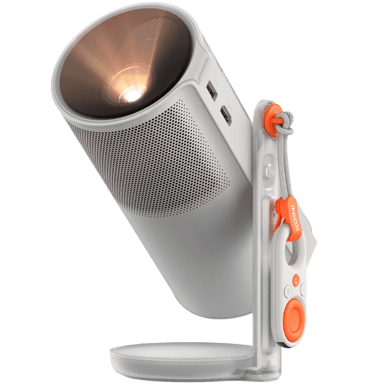

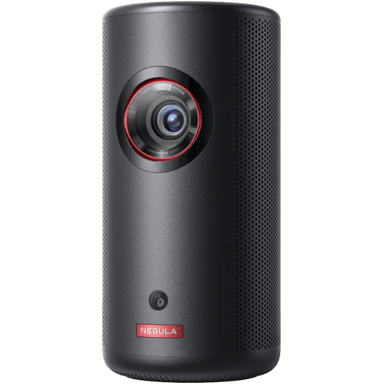
 0
Cartling
0
Cartling
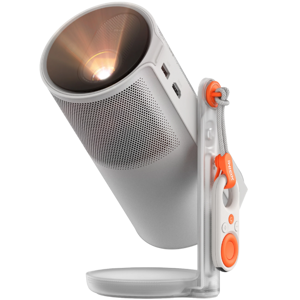
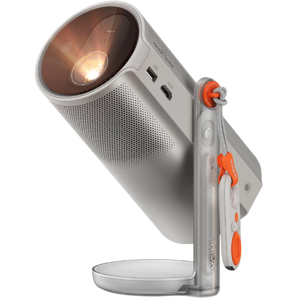
 0
Cartling
0
Cartling
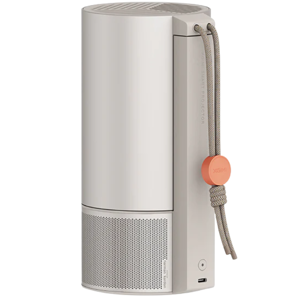
 0
Cartling
0
Cartling